



QUADRUPED ROBOTS

D2 Max

All-Terrain Level 3 Autonomous Quadruped

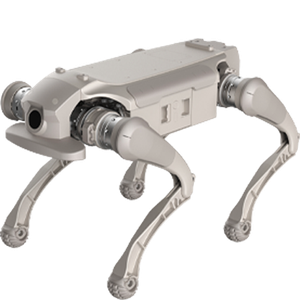
AGIBOT D2 Max front view

Meet the next generation of autonomous quadrupeds: the D2 Max

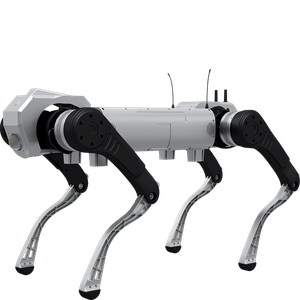
AGIBOT D2 Max is the next-generation flagship quadruped from AGIQUAD, AGIBOT’s quadruped division, and the first all-terrain Level 3 autonomous quadruped robot. It is designed to move beyond remote control, adapting to terrain, placing its feet precisely, avoiding moving obstacles and navigating and carrying loads on its own across warehouses, campuses, utility tunnels and building sites.

Best for

Autonomous field operations

Primary task

Patrol, inspection and transport

Environment

Warehouses, campuses, utility tunnels and construction sites

Deployment type

Autonomous deployment, with SPARK site assessment, training and ongoing support

Turn quadrupeds from remote-controlled tools into autonomous workers

Most robot dogs still need a person on the controls, which limits where and how often they can work.

Robot dogs need an operator

Remote-controlled quadrupeds tie up a person for every mission.

Level 3 autonomy.

D2 Max is designed for Level 3 autonomous operation, completing missions as a highly autonomous intelligent system.

AGIBOT D2 Max cleaning in use

Terrain changes stop missions

Stairs, rubble and uneven ground defeat rigid gaits.

All-terrain adaptation

Stronger terrain adaptation and precise foothold placement keep D2 Max stable on challenging ground.

People and vehicles move unpredictably

Busy sites need robots that react in real time.

Dynamic obstacle avoidance

D2 Max is built to detect and avoid moving obstacles while navigating autonomously.

AGIBOT D2 Max cleaning in use

Moving goods still needs people

Inspection robots rarely help with transport and loading.

Autonomous carrying

Autonomous navigation and carrying support inspection, transfer and loading tasks in logistics environments.

Key outcomes

Autonomous operation

Complete missions without constant remote control.

Level 3 autonomy · autonomous navigation · AGI-driven decision-making.

Frees teams from piloting the robot.

AGIBOT D2 Max

All-terrain
Mobility

Cross the ground other robots cannot.

Enhanced terrain adaptation · precise footholds · flagship AGIQUAD platform.

Detailed mobility figures to be confirmed.

AGIBOT D2 Max

Safe in busy spaces

Work around people, vehicles and equipment.

Dynamic obstacle avoidance · autonomous route planning.

Safety certification to be confirmed.

AGIBOT D2 Max

Logistics capability

Carry, transfer and load goods autonomously.

Autonomous carrying · inspection, transfer and loading tasks.

Payload and endurance to be confirmed.

AGIBOT D2 Max

What powers the D2 Max's autonomy

AGIBOT D2 Max key specifications

Level 3 autonomy

Designed to operate as a highly autonomous intelligent system rather than a remote-controlled tool.

Terrain adaptation

Enhanced adaptation to complex and changing terrain.

Precise footholds

Accurate foot placement for stable movement on difficult ground.
AGIBOT D2 Max

Dynamic obstacle avoidance

Detects and avoids moving obstacles in real time.

Autonomous navigation

Plans and follows routes across warehouses, campuses, tunnels and sites.

Autonomous carrying

Supports inspection, transfer and loading in logistics workflows.

How it works

AGIBOT D2 Max

01.

Map or configure

Prepare D2 Max for your site. Routes, inspection points and transport tasks are defined for autonomous operation.

What the D2 Max handles
Autonomous navigation and terrain perception. Sensor details TBC

Where people step in
Mission set-up requires human input.
The exact SPARK deployment process TBC

02.

Run the workflow

D2 Max patrols, inspects or carries loads on its own, adapting to terrain and avoiding moving obstacles.

What the D2 Max handles
Carries out navigation, foothold planning, obstacle avoidance and carrying.

Where people step in
Operators supervise missions and handle exceptions. Exact takeover procedures TBC

03.

Monitor and improve

Review mission results and refine routes and tasks as your operation evolves.

What the D2 Max handles
Mission data and reporting TBC

Where people step in
People remain responsible for reviewing performance and deciding when adjustments, maintenance or further configuration are needed. TBC

Use cases and environments

AGIBOT D2 Max in use

Security Patrol

Autonomous perimeter and campus patrols.

AGIBOT D2 Max in use

Night Patrols

Routine checks after hours.

AGIBOT D2 Max in use

Event Security

Mobile coverage of large venues.

AGIBOT D2 Max in use

Critical Sites

Patrolling restricted areas.

AGIBOT D2 Max in use

Utility Tunnels

Inspecting pipe and cable galleries.

AGIBOT D2 Max in use

Plants & Substations

Routine equipment checks.

AGIBOT D2 Max in use

Construction Sites

Progress and safety monitoring.

AGIBOT D2 Max in use

Mines & Energy

Reaching hazardous areas.

AGIBOT D2 Max in use

Warehouses

Autonomous transfer of goods.

AGIBOT D2 Max in use

Campuses

Moving loads between buildings.

AGIBOT D2 Max in use

Loading

Supporting loading and unloading tasks.

AGIBOT D2 Max in use

Agriculture

Field transport and monitoring.

AGIBOT D2 Max in use

Emergency Rescue

Entering areas unsafe for people.

AGIBOT D2 Max in use

Firefighting Support

Scouting and carrying equipment.

AGIBOT D2 Max in use

Universities

Autonomy and locomotion research.

AGIBOT D2 Max in use

Training Centres

Hands-on robotics education.

Product in action

Technical specifications

Specification

D2 Max

Specification

D2 Max

Specification

D2 Max

Specification

D2 Max

Specification

D2 Max

Specification

D2 Max

Specification

D2 Max

Deployment and integration

From site survey to launch, SPARK prepares your robot for your site, your workflow and your team.

01 — Site survey

We assess your requirements and site conditions to help plan your robot deployment.

02 — Mapping

The operating area is mapped for autonomous operation before handover.
03 — Workflow design

We develop a deployment plan around your site and operational requirements.

04 — Integration

Integration requirements are assessed for each deployment, while tasks, schedules and reports are managed through the app.
05 — Training

SPARK provides user training as part of its after-sales support.
06 — Launch

Launch follows completion of site preparation, mapping, workflow setup and training.

Site Assessment

Understand the facility, floor types, traffic patterns and operational requirements.
Robot Deployment

Introduce the robot into daily operations with minimal disruption.

Mapping

Configure operating areas and routes according to the environment.
Remote Monitoring

Monitor robot operations and receive performance information through the app.

Training & Handover

Provide operators with the knowledge needed to manage the robot day to day.

Ongoing Optimization

Adapt maps and update software as the facility evolves.

Training & Handover

Provide operators with the knowledge needed to manage the robot day to day.

Remote Monitoring

Monitor robot operations and receive performance information through the app.

Ongoing Optimization

Adapt maps and update software as the facility evolves.

Site Assessment

Understand the facility, floor types, traffic patterns and operational requirements.

Mapping

Configure operating areas and routes according to the environment.

Robot Deployment

Introduce the robot into daily operations with minimal disruption.
We are not a box shifter. Deployment covers site survey, mapping, workflow design, integration planning, training and launch — so your robot arrives configured for your building rather than dropped at your loading bay.

If the survey shows the robot is wrong for your site, we will say so.

upSPARK and ongoing support

From installation and user training to software updates and on-site maintenance, we provide full after-sales support.

Technology That Keeps Improving

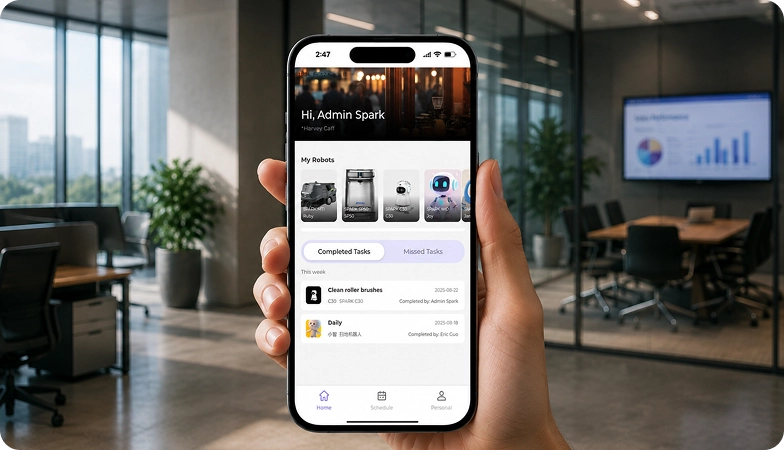
Every SPARK robot is managed through its manufacturer app and cloud platform, where operators can schedule tasks, monitor each robot remotely and review performance reports. SPARK supports you from installation and training through to software updates and maintenance.

maintenance tasks

Routine maintenance is kept simple, with clear schedules for brushes, filters, tanks and other consumables. SPARK guides your team through each task so the robot stays ready to work.

scheduling

Tasks and schedules can be set and adjusted through the app or control panel, so the robot works at the times that suit your site, including out of hours.

guided maintenance

SPARK provides step-by-step guidance for maintenance tasks, helping your team keep the robot running reliably with minimal downtime.

expert support

Our UK-based team provides expert after-sales support, including troubleshooting, on-site maintenance and help with optimising your robot routines.

Safety, compliance and governance

Safety, compliance and operating information for technical and procurement review.

Compliance

Certification and conformity

Declaration of Conformity and certification documents for this robot are available on request for technical and procurement review.

UKCA marking, IP rating and any additional certification documents are confirmed per robot.

Obstacle handling and safety

360° Environmental Awareness

SPARK robots use onboard sensors to detect obstacles, slow down or stop, and reroute where required. Detailed safety behaviour is covered in the product documentation.

UKCA marking, IP rating and any additional certification documents are confirmed per robot.

Operating boundaries

Mapped operating areas

The robot operates within the mapped areas and configured routes set up during deployment. Operating conditions are listed in the technical specifications above.

UKCA marking, IP rating and any additional certification documents are confirmed per robot.

Data and privacy

App and cloud management

Tasks, schedules and reports are managed through the manufacturer app and cloud platform. Details of data handling and privacy are shared as part of deployment planning.

UKCA marking, IP rating and any additional certification documents are confirmed per robot.

Documents for review

Documentation pack

The user manual, specification sheet and conformity documentation can be shared for technical and procurement review.

UKCA marking, IP rating and any additional certification documents are confirmed per robot.

Choosing between Spark quadruped robots

AGIBOT D1 Pro/Edu quadruped robot D1 Pro/Edu
AGIBOT D1 Ultra quadruped robot D1 Ultra
AGIBOT D1 MaxPro quadruped robot D1 Max Pro
Primary Task
Research, teaching & demos
Inspection & security patrol
Heavy-load field missions
Best For
Universities & schools
Industrial & outdoor sites
Construction, rescue & logistics
Payload
5 kg
5 kg
50 kg
Max. Speed
3.5 m/s
3.7 m/s
2 m/s (limited)
Stairs / Slope
16 cm / 40°
16 cm / 40°
30 cm / 45°
Protection
–
IP54
IP67
Run Time / Range
1–2 hrs / 6 km
6 ± 1 km
5.5 hrs / 21 km

Frequently asked questions

Questions about using the D2 Max at your site

AGIBOT D2 Max
What is the D2 Max?

The next-generation flagship quadruped from AGIBOT’s quadruped division AGIQUAD, described by AGIBOT as the first all-terrain Level 3 autonomous quadruped robot.

D2 Max is designed to complete missions as a highly autonomous system rather than being driven by remote control, with people supervising and handling exceptions.

Security patrol, industrial inspection, emergency rescue, logistics, agriculture and education, including inspection, transfer and loading tasks.

AGIBOT targets warehouses, campuses, utility tunnels and construction sites, with enhanced terrain adaptation and precise footholds.

AGIBOT has not yet published full specifications such as payload, speed, endurance or protection rating. Contact SPARK for the latest information.

It is the next generation after the D1 Pro/Edu, D1 Ultra and D1 Max/MaxPro, adding Level 3 autonomy and autonomous carrying.

Contact the SPARK support team. We provide after-sales support including troubleshooting, software updates and on-site maintenance for your D2 Max.

Tell us about your site

See whether the D2 Max is right for your operation. Tell us a little about your site and what you need, and our team will help you assess the right setup.